Four tools for one feature
Your REST client can't open a socket, so you keep wscat, an MQTT client and a GraphQL playground open beside it.
REST, GraphQL, WebSocket, SSE, MQTT and Socket.IO all live in the same window, in the same folders.
Your app talks REST, sockets, subscriptions and gRPC. Your API client should too, and the collection describing it should be reviewable like any other code. KnockPort does both, from files on your own disk, with nothing to sign into.
Free forever · No account required · Works offline
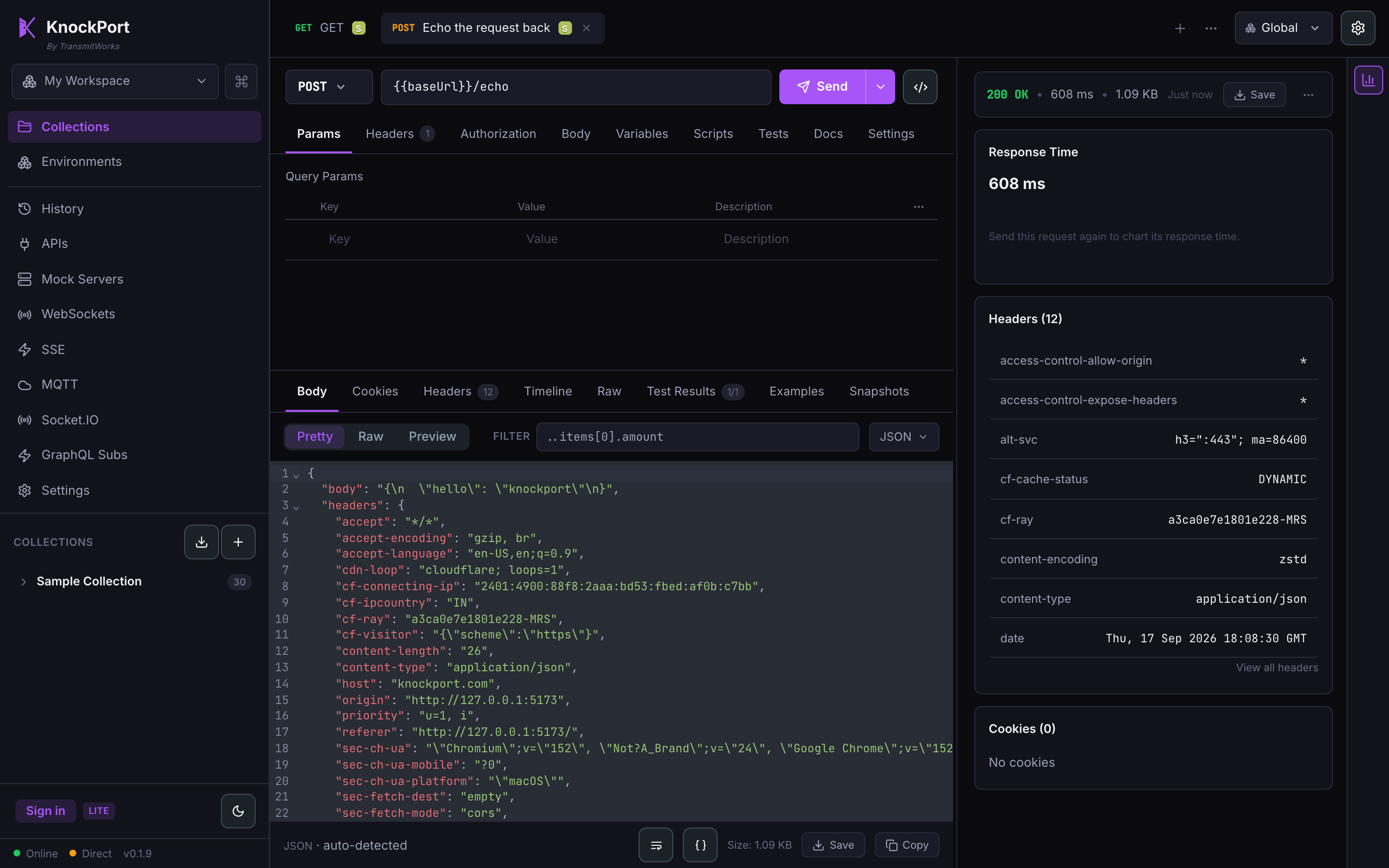
One app, one request model
Why KnockPort
You shouldn't have to.
Your REST client can't open a socket, so you keep wscat, an MQTT client and a GraphQL playground open beside it.
REST, GraphQL, WebSocket, SSE, MQTT and Socket.IO all live in the same window, in the same folders.
Clients that do support sockets treat them as a scratchpad. Close the tab and the URL, the subscribe frame and the topics are gone.
A socket is an ordinary saved request. Its messages, topics and variables travel with your collection.
Your collections sit in someone else's cloud behind an account, and a flaky connection means you can't test anything.
No account, and your requests, collections and tokens never leave your machine - it works fully offline, and syncs through your own git when you want it. The only thing it sends is an anonymous install-count ping per version: a random id and the version number, no request data.
The moment you need mTLS, NTLM, Digest or a service on localhost, the browser-based tools quietly can't.
Sending happens on your machine, so private networks, client certificates and eight auth schemes all just work.
Your collection changes in someone's cloud. There is no diff, no branch, no review, and no way to tell what changed between two releases.
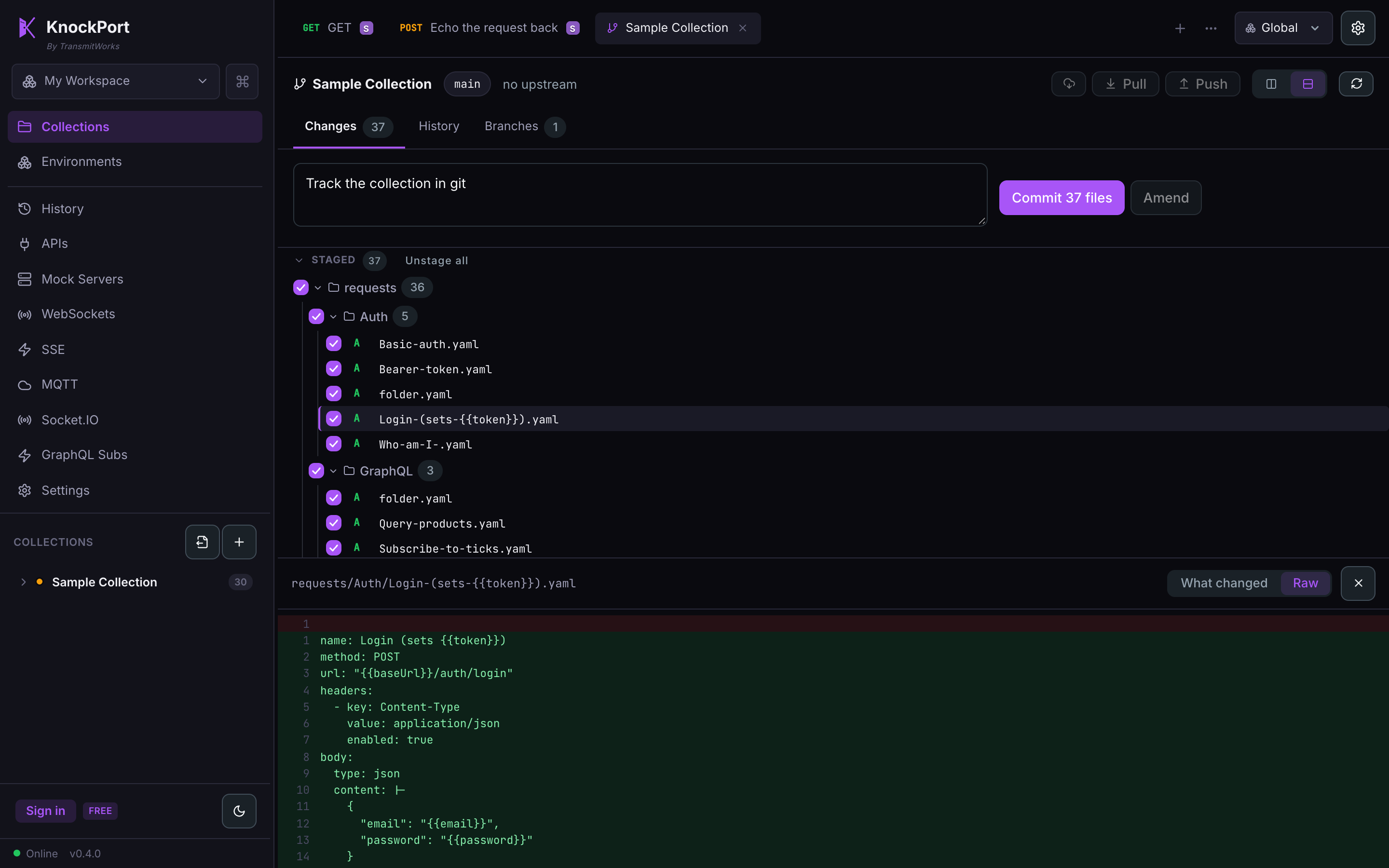
Collections are plain files, and git is built in. Branch, commit, diff and amend in the app; open the pull request where you open every other one. The app itself is source-available too - every release ships its full source to read and audit.
Git, built in
Collections are plain files, so a change to a request is a diff you can read and revert - not a mystery edit in someone's cloud workspace. Branch, commit and amend in the app, then open the pull request wherever you open every other one.
Realtime, done properly
Most clients bolt sockets on as one global panel that forgets everything the moment you close it. In KnockPort a WebSocket sits in a folder next to your REST calls, with its messages and subscriptions saved alongside it.
{{baseUrl}} works in socket URLs, topics and payloads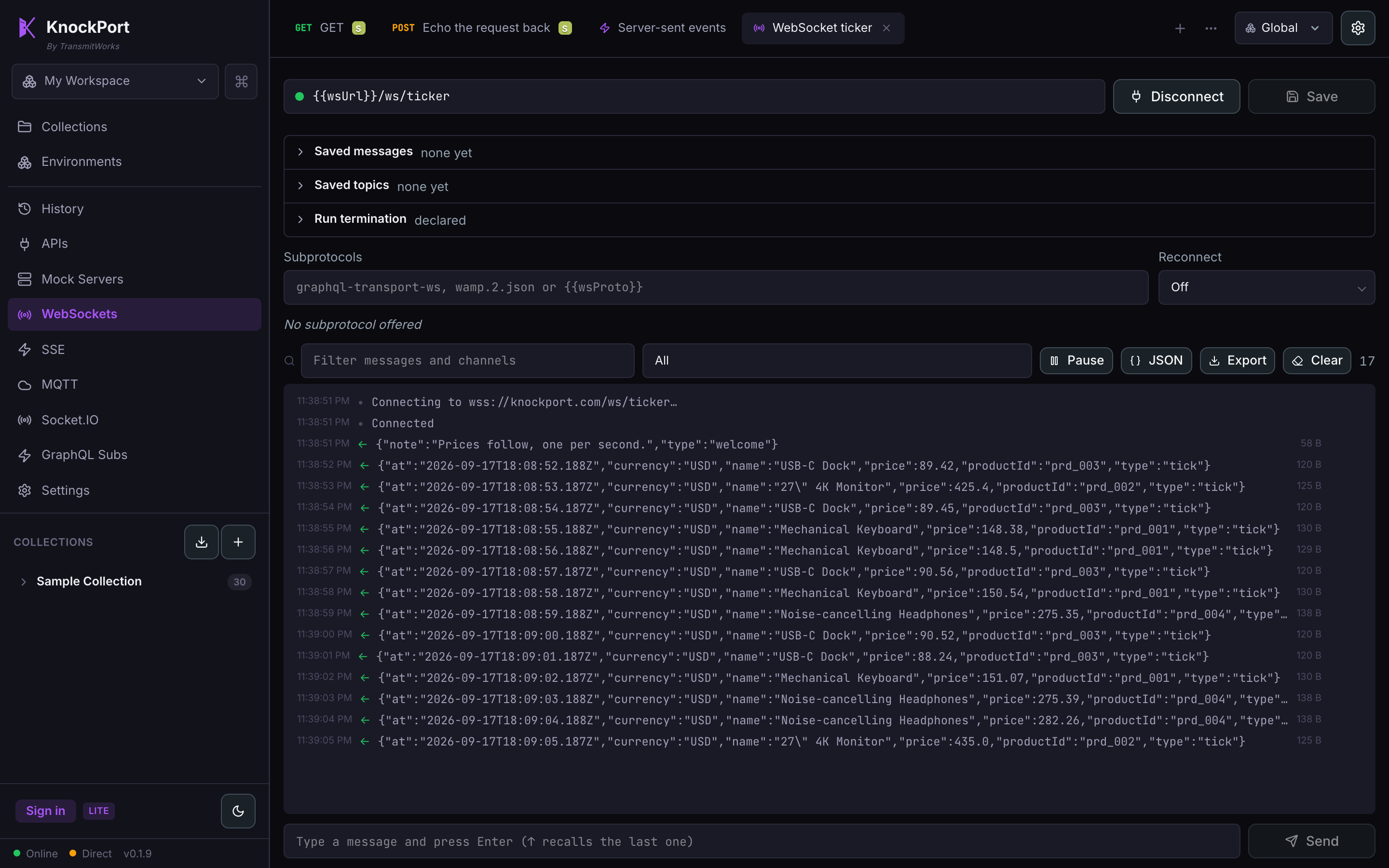
Streams you can read
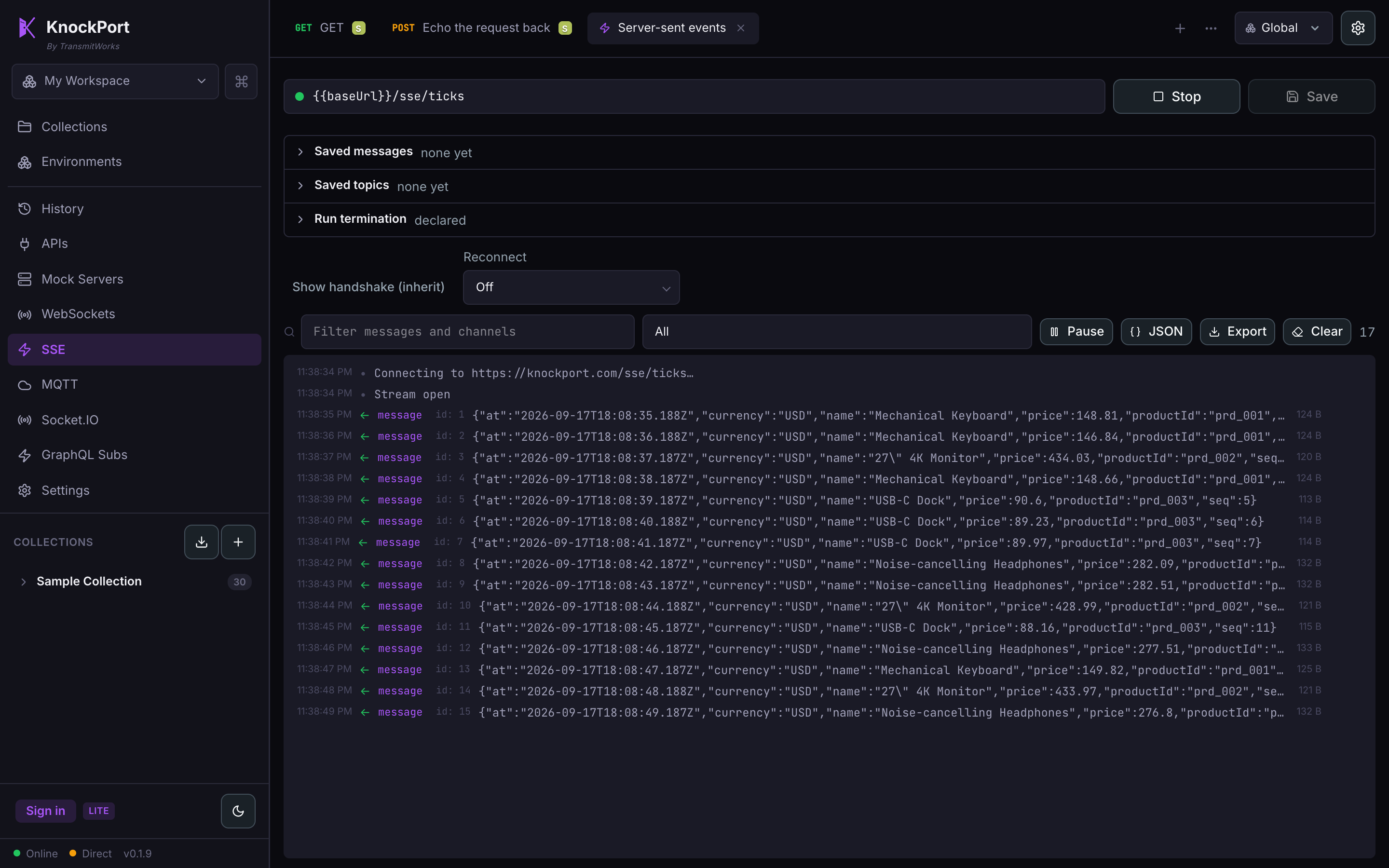
Server-sent events carry names and ids. Tools that render them as one undifferentiated blur make you squint at a wall of text, or show you nothing at all and call it working.
Coming from somewhere else
Import what you already have from Postman, Insomnia, Bruno, OpenAPI, HAR or a curl command, then notice what you stop working around.
Everything else
Run a folder end to end, with tests, and see every response.
Serve an endpoint back before the backend exists.
Pre-request and post-response JavaScript, assertions that fail loudly.
Swap dev, staging and prod without touching a request.
Basic, Bearer, OAuth 1 & 2, Digest, NTLM, Hawk and WSSE.
Every hop, with its own timing breakdown.
Turn any request into curl, JavaScript or Python.
Filter, prettify, diff against saved examples, snapshot.
Branches, commits, diffs and amends over your collection files.
pm.*, bru.* and chai run as they are. No rewrite.
Postman, Insomnia, Bruno, Hoppscotch, OpenAPI, HAR and curl.
Unary and streaming, with reflection and a stream view.
A versioned SDK for importers, themes and protocols.
Every action, one keystroke away.
Per-collection, inspectable, and it survives a restart.
Every request you send, saved and searchable - reopen any of them.
On the way
None of this is in the app yet. It is here so you can tell where KnockPort is going before you commit a team's collections to it.
The same app in a browser tab, for when you cannot install one. It shares the collection format rather than reimplementing it.
Describe the call you want and have it built, run and asserted against, with the request left in your collection to read rather than hidden behind a chat log.
Expose your collections as tools an AI assistant can call, and consume MCP servers as requests like any other protocol.
Take a collection you already have and run it under load, from the same file, without rewriting it as a script.
Try before you install
KnockPort opens with a ready-made collection wired to a public demo API that speaks every one of them. Press Send and watch a login token flow straight into the next request, with nothing to set up.
# see your own request, reflected back
curl https://knockport.com/echo -d '{"hello":"knockport"}'

# a live stream you can watch arrive
curl -N 'https://knockport.com/sse/ticks?count=5'The desktop app is the whole product: every protocol, your files on your disk, and requests that leave from your machine, which is what makes localhost, client certificates and private networks work at all.
Get KnockPort on macOS
curl -fsSL https://knockport.com/install.sh | shbrew install --cask transmitworks/tap/knockportAfter Homebrew, clear the download flag once: xattr -dr com.apple.quarantine /Applications/KnockPort.app (Homebrew dropped the --no-quarantine flag in 6.x).
Verifies its SHA-256 and installs to Applications. A direct .dmg is refused on first launch as "damaged" until you clear quarantine, because KnockPort is not notarized by Apple yet (see Privacy).
Get KnockPort on Windows
curl -fsSL https://knockport.com/install.bat -o "%TEMP%\kp.bat" && "%TEMP%\kp.bat"Prefer PowerShell? This does the same:
Invoke-RestMethod https://knockport.com/install.ps1 | Invoke-ExpressionVerifies its SHA-256 and runs the installer. A command-line download avoids the SmartScreen warning a browser download triggers, because KnockPort is not code-signed yet (see Privacy).
Get KnockPort on Linux
curl -fsSL https://knockport.com/install.sh | shDownloads the AppImage to ~/.local/bin and verifies its SHA-256. Prefer a native package? Use the .deb or .rpm above.
All downloads and past releases
v0.4.1. The complete API client, free forever - no account to create.